EAN-13 Barcode Dimensions
This page contains information about the official standards for barcode size and symbol dimensions. Keep this in mind when putting barcodes onto your products, especially if you are re-sizing or truncating the barcodes. If your barcode is too small, some barcode scanners may not be able to read it.
If your retailers require barcode verification on the final printed barcode before your product is allowed to enter their stores, following the standards below will help your barcode pass verification.
NOTE – the height and width of the barcode can be varied independently; e.g. you could have 120% width and 90% height if you wish.
The smallest recommended barcode size for an EAN-13 barcode is 80% of standard size (approx. 30mm wide x 20mm high).
At 100% magnification:
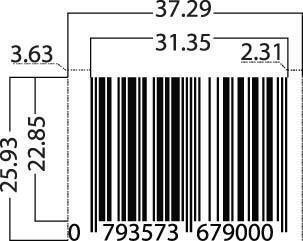
Barcode Magnification Standards:
The specified magnification range for an EAN-13 Bar Code Symbol being scanned at retail POS is 80% – 200% (X-dimension 0.26 mm-0.66 mm).
Note: Refer to the total width column (from the chart below) for the total barcode width. The total width includes the “Bar Area Width” and the “Left Quiet Zone” and “Right Quiet Zone” dimensions. Therefore, a barcode at 80% magnification (the smallest barcode size) must be at least 29.83mm wide.
Dimensions (All measurements in millimetres)
| Magnification | X-dimension | Bar Area Width | Bar height | Left Quiet Zone | Right Quiet Zone | Total Width |
|---|---|---|---|---|---|---|
| 0.80 | 0.26 | 25.08 | 18.28 | 2.90 | 1.85 | 29.83 |
| 0.85 | 0.28 | 26.65 | 19.42 | 3.09 | 1.96 | 31.70 |
| 0.90 | 0.30 | 28.22 | 20.57 | 3.27 | 2.08 | 33.57 |
| 0.95 | 0.31 | 29.78 | 21.71 | 3.45 | 2.19 | 35.42 |
| 1.00 | 0.33 | 31.35 | 22.85 | 3.63 | 2.31 | 37.29 |
| 1.05 | 0.35 | 32.92 | 23.99 | 3.81 | 2.43 | 39.16 |
| 1.10 | 0.36 | 34.49 | 25.14 | 3.99 | 2.54 | 41.02 |
| 1.15 | 0.38 | 36.05 | 26.28 | 4.17 | 2.66 | 42.88 |
| 1.20 | 0.40 | 37.62 | 27.42 | 4.36 | 2.77 | 44.75 |
| 1.25 | 0.41 | 39.19 | 28.56 | 4.54 | 2.89 | 46.62 |
| 1.30 | 0.43 | 40.76 | 29.71 | 4.72 | 3.00 | 48.48 |
| 1.35 | 0.45 | 42.32 | 30.85 | 4.90 | 3.12 | 50.34 |
| 1.40 | 0.46 | 43.89 | 31.99 | 5.08 | 3.23 | 52.20 |
| 1.45 | 0.48 | 45.46 | 33.13 | 5.26 | 3.35 | 54.07 |
| 1.50 | 0.50 | 47.03 | 34.28 | 5.45 | 3.47 | 55.95 |
| 1.55 | 0.51 | 48.59 | 35.42 | 5.63 | 3.58 | 57.80 |
| 1.60 | 0.53 | 50.16 | 36.56 | 5.81 | 3.70 | 59.67 |
| 1.65 | 0.54 | 51.73 | 37.70 | 5.99 | 3.81 | 61.53 |
| 1.70 | 0.56 | 53.30 | 38.85 | 6.17 | 3.93 | 63.40 |
| 1.75 | 0.58 | 54.86 | 39.99 | 6.35 | 4.04 | 65.25 |
| 1.80 | 0.59 | 56.43 | 41.13 | 6.53 | 4.16 | 67.12 |
| 1.85 | 0.61 | 58.00 | 42.27 | 6.72 | 4.27 | 68.99 |
| 1.90 | 0.63 | 59.57 | 43.42 | 6.90 | 4.39 | 70.86 |
| 1.95 | 0.64 | 61.13 | 44.56 | 7.08 | 4.50 | 72.71 |
| 2.00 | 0.66 | 62.70 | 45.70 | 7.26 | 4.62 | 74.58 |
“Bar Area Width” = the width of the bars only (does not include the width of the left and right Quiet Zones).
“Bar Height” = the height of the bars only. Allow extra space to include the barcode number. The number should be printed below the bars.
“Quiet Zone” = the blank space on either side of the barcode. These are compulsory (scanners need them to read the barcode bars). Many barcode images have a > on the right-hand side after the numbers. This is optional but gives a visual indication of the right-side quiet zone needed.
An allowable minimum magnification of 75% (X-dimension 0.25mm) applies only to on-demand (e.g. thermal) print processes. In this case, the bar height should never be truncated below the minimum required height for an 80% magnification barcode symbol.
An item may also be scanned in a General Distribution Scanning environment (automated scanning). The allowable magnification range is 150% to 200% (X-dimension 0.50mm – 0.66mm).

“Yep, received barcode. Thanks heaps again for your speedy service. ” Charles
“Many thanks David for your very prompt service. A great experience for a novice like me! ” Tazz
“David has been exceptionally helpful, and is very knowledgeable on Bar Codes, so if you have any questions for him I am sure he would be happy to answer. ” Jodie